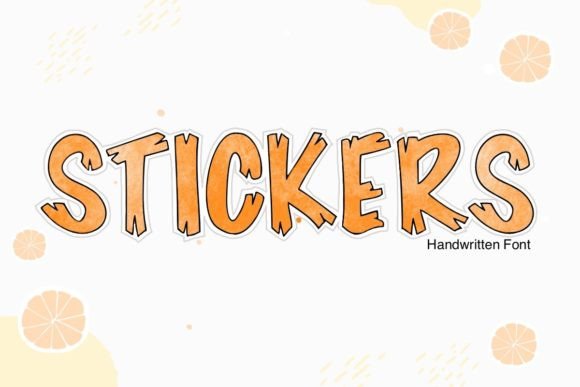
Stickers Font for Web Design
I was working on a new boutique website last week, and I needed a font that would bring some character to the hero section. The client wanted something playful yet professional—something that would speak to their young audience without losing the brand’s credibility. That’s when I stumbled upon Stickers, a fun and playful outline display font that immediately caught my eye.
Stickers has this charming, hand-drawn feel with clean outlines that make it stand out. It’s not too wild or over-the-top, which is perfect for a brand that wants to be approachable but still have a unique visual identity. When I tested it in the hero section of the site, it looked great layered over a soft background image of handmade products. The contrast between the bold, outlined text and the muted tones of the image created a nice balance.
Playful Yet Professional: A Perfect Fit for Digital Branding
One of the first things I noticed about Stickers is how well it works as a display font. It’s ideal for headlines, call-to-action buttons, and section titles where you want to grab attention without overwhelming the user. I used it on a product landing page for a line of children’s toys, and it instantly gave the page a more engaging and inviting look.
The font’s playful nature makes it especially suitable for creative industries like art supplies, stationery, or kids’ products. But what surprised me was how well it worked alongside more traditional fonts. I paired it with a clean sans serif font for body copy, and the contrast helped maintain readability while keeping the design visually interesting.
For example, on a blog redesign project, I used Stickers for the header and subheadings, then switched to a simple sans serif for the main content. This combination kept the tone light and friendly, which matched the blog’s focus on DIY crafts and creative living.
Responsive Layouts and Readability Considerations
As a web designer, one of my top priorities is ensuring that text remains legible across all screen sizes. Stickers performed well on mobile devices, even at smaller sizes. The outlined style helped the text remain clear and readable, even when scaled down. However, I did notice that on very small screens, such as mobile phones, the font might benefit from slightly increasing the line height or adjusting the spacing between letters to avoid crowding.
I also tested it on dark mode sections of the site, and the outlined style made the text pop against darker backgrounds. This versatility means it can be used effectively in different parts of a website, whether you’re designing a bright and cheerful landing page or a more subdued section with a darker color palette.
When using Stickers for buttons or CTA areas, I found that pairing it with a contrasting color helped improve click-through rates. The boldness of the font made the buttons stand out, which is crucial for guiding users through the site.
Limitations and Best Practices for Using Stickers
While Stickers is a fantastic display font, it’s not ideal for long paragraphs or dense blocks of text. Its decorative nature means it’s better suited for short phrases, headings, and titles rather than extended body copy. For instance, I wouldn’t recommend using it for navigation menus or form labels where clarity and accessibility are key.
If you're considering using Stickers for a client project or your own website, it's important to check the font’s file formats, licensing options, and multilingual support. Some display fonts may not include all the characters needed for international audiences, so verifying that is essential before finalizing your design choices.
Also, ensure that the font is available as a webfont if you plan to use it on a live site. Many premium fonts offer webfont packages that allow for smooth loading and performance optimization, which is especially important for fast-loading websites.
Real-World Applications and Creative Possibilities
From a practical standpoint, Stickers is a versatile choice for digital projects. I’ve used it on course sales pages to create an energetic and inviting atmosphere, on campaign landing pages to highlight key messages, and even on portfolio sites to add a personal touch to project titles.
Its outline style also works well for image overlays, making it a great option for banners or promotional graphics where you want the text to stand out against a busy background. I experimented with placing it over a photo of a handmade candle label, and the result was visually appealing and consistent with the brand’s aesthetic.
In summary, Stickers is a fun, expressive display font that brings a sense of authenticity and playfulness to any digital project. Whether you're designing a boutique online store, a coaching website, or a creative portfolio, this font can help elevate your brand’s visual identity without sacrificing usability or professionalism. Just remember to pair it wisely and use it where it shines most—on display text that needs to capture attention and convey personality.